


Dell Universal Dock D6000 – USB-C & USB 3.0 Docking Station with 4K Triple Display Support
Dell Universal Dock D6000 – USB-C & USB 3.0 Docking Station with 4K Triple Display Support
Couldn't load pickup availability
Dell Universal Dock D6000 – USB-C & USB 3.0 Docking Station with 4K Triple Display Support
Product Description
Upgrade your laptop workspace with the Dell Universal Dock D6000, a powerful docking station designed to connect your laptop to multiple monitors, USB devices, Ethernet, audio accessories, and other peripherals through a single connection.
The D6000 supports both USB-C and USB 3.0 Type-A host connections and uses DisplayLink technology for flexible docking across compatible computers. With support for up to three external displays when connected through USB-C, it is an excellent solution for office work, professional workstations, home offices, trading setups, productivity, and multi-screen environments.
It can also provide up to 65W Power Delivery to compatible USB-C laptops, helping reduce cable clutter on your desk.
Key Features
-
Genuine Dell Universal Dock D6000
-
USB-C and USB 3.0 Type-A host connectivity
-
DisplayLink technology
-
Supports up to 3 external displays via USB-C
-
Supports up to 2 external displays via USB 3.0 Type-A
-
Up to 4K display support depending on connection and configuration
-
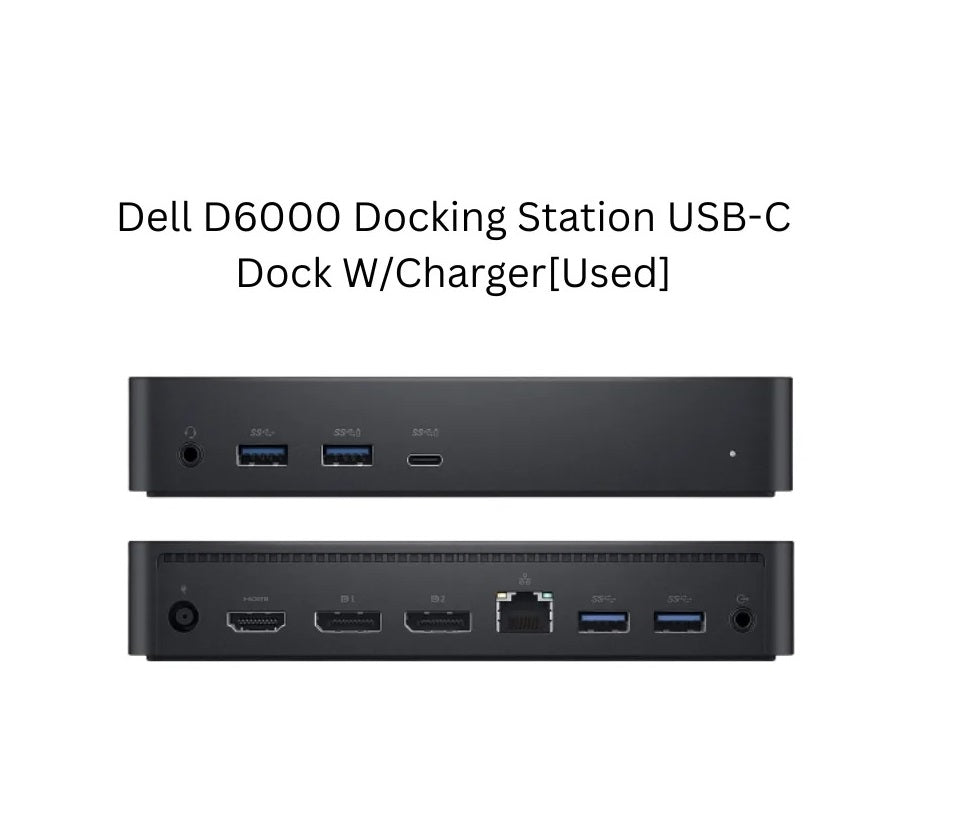
2 × DisplayPort outputs
-
1 × HDMI output
-
4 × USB 3.0 Type-A ports
-
1 × USB-C front port with data/PowerShare
-
Gigabit Ethernet RJ45
-
Front headphone/microphone combo jack
-
Rear audio line-out
-
Up to 65W USB-C Power Delivery
-
130W AC power adapter
-
Kensington security slot
-
Ideal for professional and home-office setups
Ports & Connectivity
Video:
-
2 × DisplayPort
-
1 × HDMI
USB:
-
4 × USB 3.0 Type-A
-
1 × USB-C PowerShare/Data port
Networking:
-
1 × Gigabit Ethernet RJ45
Audio:
-
Headphone/Microphone combo
-
Audio line-out
Host Connection:
-
USB-C
-
USB 3.0 Type-A through included USB-C-to-A adapter
Dell specifies support for configurations including up to three 4K displays over USB-C, while USB 3.0 Type-A supports up to two displays. Exact resolution and refresh rate depend on the connection and monitor configuration.
Power Delivery
The Dell D6000 can provide up to 65W Power Delivery to compatible Dell and non-Dell USB-C laptops. The included power adapter is rated at 130W.
Perfect For
-
Office workstations
-
Home offices
-
Work-from-home setups
-
Multiple monitor setups
-
Business professionals
-
Developers and programmers
-
Stock/trading workstations
-
Graphic and productivity setups
-
Laptop docking
-
Connecting keyboard, mouse, printer and storage
-
Ethernet/network connectivity
-
Connecting external displays
Display Support
With a compatible USB-C connection and DisplayLink driver, the D6000 can support multiple external monitors, including configurations using DisplayPort and HDMI. Dell lists support for up to 5K at 60Hz in certain dual-DisplayPort configurations and up to three displays depending on the setup.
Important: Display performance depends on the laptop, operating system, DisplayLink driver, monitor configuration and connection type.
Compatibility
Compatible with many laptops and computers equipped with:
-
USB-C
-
USB 3.0 Type-A
DisplayLink driver installation may be required for full docking functionality. Check your laptop's USB-C capabilities and system compatibility before ordering.
Package Includes
-
Dell Universal Dock D6000
-
USB-C cable with USB-A adapter
-
130W AC Power Adapter
-
Power Cable
Why Buy Dell D6000?
One Dock. Multiple Connections. Cleaner Workspace.
Connect your laptop to monitors, keyboard, mouse, network, audio devices and USB accessories through one convenient docking station. The D6000 is an excellent choice for users who need a professional multi-monitor workstation without repeatedly connecting and disconnecting individual peripherals.


Shop With Confidence
Why Choose Us?
A One World Super Store is your trusted destination for premium tech accessories, beauty essentials, and home gadgets. We deliver quality products worldwide with fast shipping and dedicated customer support.