USB-C to Dual HDMI 4K Adapter CableCreation | Thunderbolt 3 Compatible | Dual Monitor Display for MacBook Pro, Dell XPS, Surface Book & Chromebook
USB-C to Dual HDMI 4K Adapter CableCreation | Thunderbolt 3 Compatible | Dual Monitor Display for MacBook Pro, Dell XPS, Surface Book & Chromebook
Couldn't load pickup availability
USB-C to Dual HDMI 4K Adapter – Product Description for Pakistan
USB-C to Dual HDMI 4K Adapter | Thunderbolt 3 Compatible | Dual Monitor Display
Expand your workspace with this high-performance USB-C to Dual HDMI Adapter. Connect up to two HDMI monitors or TVs from a single USB-C or Thunderbolt 3 port and enjoy stunning 4K Ultra HD visuals for work, presentations, entertainment, and multitasking.
Important Compatibility Notice
⚠️ Before Purchase: Ensure your laptop, PC, or tablet supports Thunderbolt 3 or DisplayPort Alternate Mode (DP Alt Mode) via USB-C. Devices without DP Alt Mode video output are not compatible.
Key Features
✔ Dual HDMI output from one USB-C port
✔ Supports resolutions up to 4K UHD (3840×2160) @ 30Hz
✔ Plug & Play – No drivers or software required
✔ Compatible with Thunderbolt 3 and USB-C devices supporting video output
✔ Compact, lightweight, and easy to carry
✔ Perfect for office, business, education, gaming, and home entertainment
Display Modes
For Windows Users
- Supports both Mirror Mode and Extend Mode
- Easily switch display modes using:
Windows Key + P → Duplicate or Extend
For MacBook Users
- Supports Mirror Mode when two external HDMI displays are connected.
- Both HDMI screens will show the same image, while remaining separate from the MacBook display.
4K Resolution Support
- Supports up to 4K@30Hz on connected displays.
- Use HDMI 1.4 or higher cables for best performance and to prevent screen flickering.
- If display issues occur, lower the output resolution to match the monitor specifications.
Compatible Devices
- MacBook Pro 2020 / 2019 / 2018 / 2017
- MacBook Air USB-C Models
- Dell XPS 13 / 15
- Microsoft Surface Book 2
- Chromebook Pixel
- Lenovo Yoga 710
- Thunderbolt 3 Laptops
- USB-C Devices with DP Alt Mode
Product description

How to Set Dual Display on Windows

Dual mode under Windows system:
Mirror Mode:
laptop shows "A" + 2 extension displays show "A" is available
Extend Mode:
1: laptop shows "A" + 2 extension displays show “A” is available
2:laptop shows "A" + 2 extension displays show “B” is available
3: laptop shows "A" + 1 extension display shows “B” + 1 extension display shows "C" is available
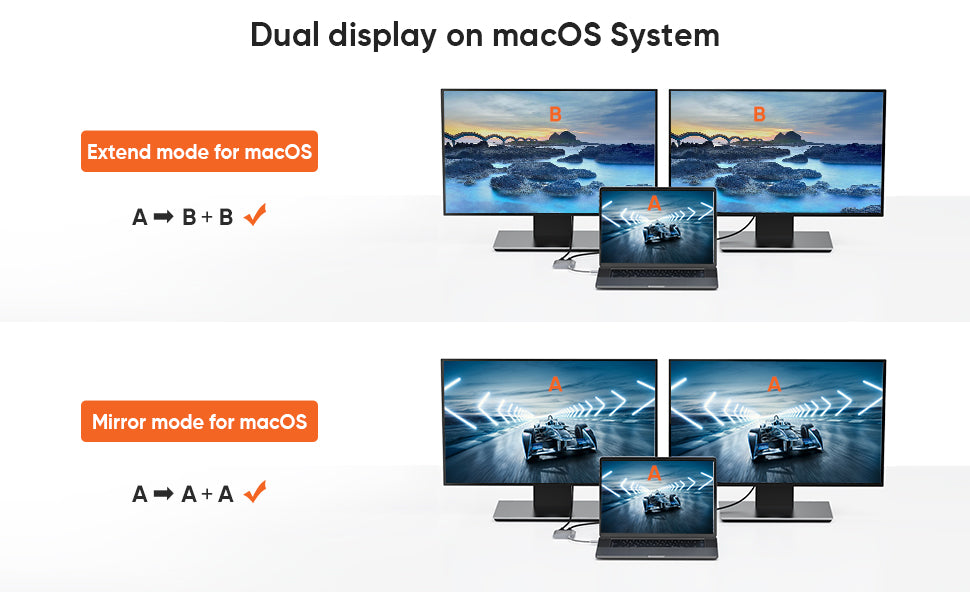
How to Set Dual Display on MacBook

Dual mode under macOS system:
Mirror Mode:
laptop shows "A" + 2 extension displays show "A" is available
Extend Mode:
1: laptop shows "A" + 2 extension displays show “A” is available
2:laptop shows "A" + 2 extension displays show “B” is available
3: laptop shows "A" + 1 extension display shows “B” + 1 extension display shows "C" is NOT AVAILABLE

High Quality Material
- Aluminum alloy case
- Durable cotton braided cable

Dual 4K Monitor
You will get two monitors with HDMI at 4K@30Hz

Compact & Portable
Easy to carry around, perfect for business travel or home office.